
Help
FAQ
Have a question? The most common ones about Elmony are collected here.
General
How is Elmony different from Lovable, v0, or Bolt?
Elmony runs locally and keeps your generated code on your machine, so you can hop between tools or manage the repo yourself without lock-in.
You can plug in any API keys you want, selecting the models and providers that make the most sense for your workflow (Gemini, Anthropic, OpenAI, and more).
Where is my code stored?
Every Elmony project lives in a regular folder on your computer. Open the app details card (click the app name in the top-left) to see its path. The default looks like: ~/elmony-apps/APP_NAME
Why does Windows Defender SmartScreen warn me?
SmartScreen can warn about a newly downloaded installer. Download Elmony only from the official source and verify that the installer is signed by the expected Elmony publisher before you continue.
What are the system requirements?
Install the official Elmony package built for your operating system and CPU architecture. Packaged releases include their own Node.js and pnpm runtime; you do not need to install those tools separately.
On lower-powered hardware, consider cloud-hosted models (Gemini, OpenRouter, etc.) rather than local ones.
Does Elmony support mobile apps?
Yes. Elmony creates mobile projects with Expo and React Native, provides Expo device previews, and supports Expo Application Services (EAS) workflows for store builds.
Elmony does not generate standalone Swift or Kotlin projects; its mobile workflow is centered on the Expo ecosystem.
Can I use languages other than JavaScript?
Not today. Supporting multiple language stacks would significantly complicate the product for both users and maintainers.
How do I migrate settings between machines?
Follow the Migrate & Restore guide for step-by-step instructions on moving your workspace.
AI
Why am I seeing rate limit errors?
Check for quotas or usage caps with your provider. The rate limit guide lists common fixes.
What is a context limit error?
It means the prompt, conversation, attachments, and selected code are larger than the active model's context window. Use balanced Smart Context, manually select fewer files, or start a focused new chat.
A provider rate or spending limit is a different error. Check that provider or subscription-agent account for its current usage and reset time.
Why are local model outputs poor?
Small local models may struggle with long instructions, tool use, or multi-file changes. Try a stronger model that fits your hardware, reduce the context, or switch to a configured API model or subscription agent.
Troubleshooting
Why won't the Node.js setup step clear?
Visit the Node.js troubleshooting page for fixes.
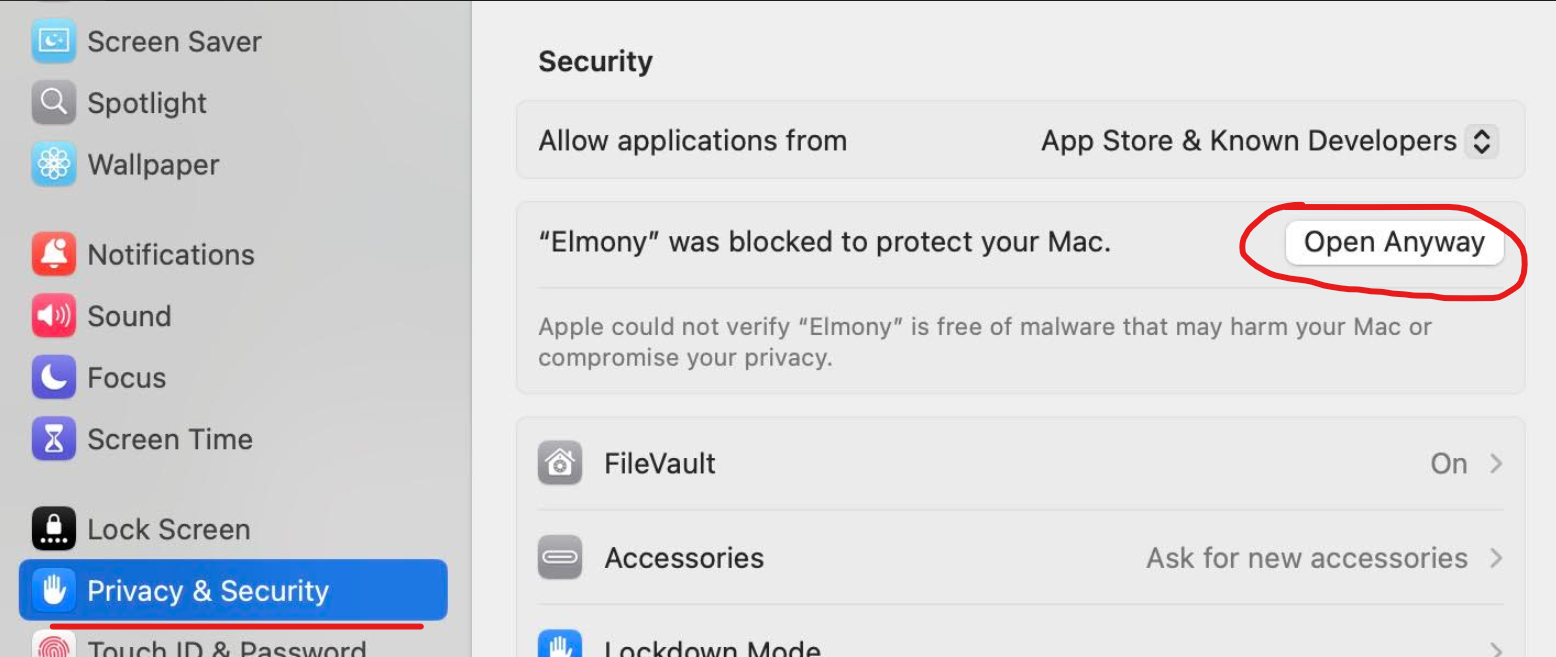
macOS says Elmony is blocked. How do I open it?
Official macOS releases are signed and notarized. First confirm that you downloaded Elmony from the official source. If macOS still blocks that copy, open System Settings > Privacy & Security, click Open Anyway next to Elmony, and confirm the prompt.
My preview never loads. What should I check?
Open the Console below the preview to read install, build, and server logs. A project's first preview may need to download dependencies. Fix the reported error and try Restart; use Rebuild if dependencies need to be installed again.
I want to roll back after a bad upgrade.
Elmony keeps automatic backups of your settings before each upgrade. The Migrate & Restore guide shows where those backups live and how to restore.